






RCSB PDB Help
Search and Browse > Advanced Search
3D Motif Search
Introduction
Structure motifs are the spatial or 3D arrangement of a small number of amino acids (at least 2) that have significance - e.g., form a catalytic or binding site. The amino acid residues making up the motif may be remote from one another in the 1D sequence or even be located in different polymer chains as long they are close to each other in 3D space (within 20 Å of each other). The structure motif search service (Bittrich et al., 2020) retrieves all occurrences of specific structure motifs in 3D structures available from RCSB.org.
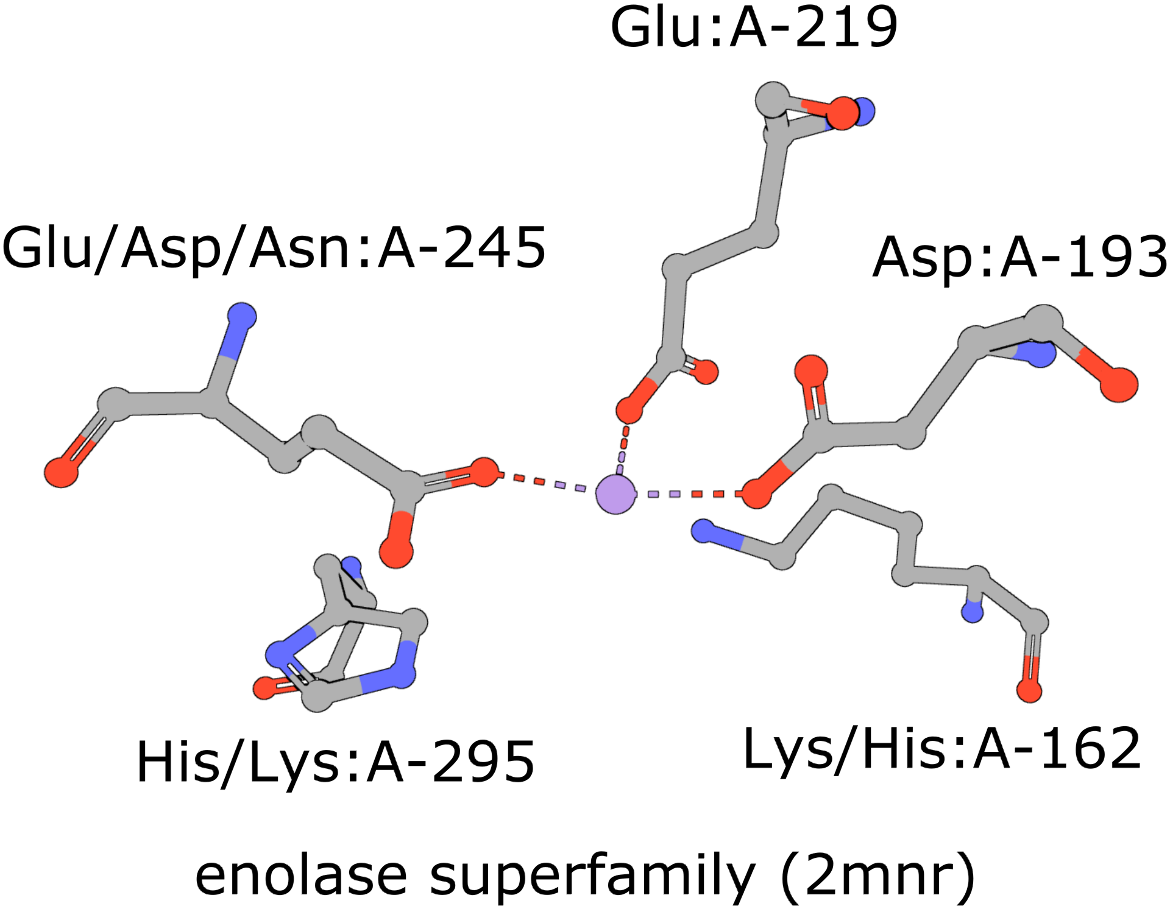
The active site of the enolase superfamily is used as an example here (Meng et al., 2004). The enolase superfamily is a group of proteins diverse in sequence, yet largely similar in 3D structure that all catalyze removal of a proton from a carboxylic acid (Babbitt et al., 1996).
|
| Five residues representing the enolase superfamily are shown here. Note multiple amino acids are seen at three of these positions. The amino acids are identified by their amino acid name 3 letter abbreviation, chain ID (label_asym_id) and residue number (label_seq_id). |
The 3D Motif search is particularly useful when you are interested in exploring the local structural properties of protein structures. This search complements the 3D Similarity search and finds local, structural similarities between proteins. Search results only depend on the residues specified in the query, so it can identify local structural similarities even when the proteins have limited sequence or overall structural similarity. So, for example, this search can find similar ligand binding sites in unrelated proteins, regardless of whether the structures have a ligand bound in that neighborhood.
Detection of such 3D motifs can provide valuable insights into the function(s) of previously uncharacterized proteins, especially ones that do not resemble other proteins at either the sequence or global structure level.
Documentation
You can access the 3D Motif search by opening Advanced Search and clicking on (+) 3D Motif from the list of available search tools, or go directly to the search using this link: 3D Motif Search.
How to Provide a Query
The 3D Motif search three ways to provide a query structure:
Select an existing PDB or CSM structure
You can choose a structure directly from the PDB archive or from the available Computed Structure Models (CSMs). Once selected, the structure will be automatically loaded and used as your query structure.
Upload a local coordinates file
You can upload a structure file from your computer in a supported format, such as PDB, mmCIF, or BinaryCIF. Once uploaded, the coordinates are automatically loaded and used as your query. Supported file types:
- .pdb, .ent, .cif, .bcif
- Gzipped versions of the above (.gz)
After selecting a file, it is automatically uploaded to the RCSB PDB servers and assigned a unique, randomly generated URL. This URL is not guessable by other users; however, anyone with the link can access the file.
Availability
Uploaded files remain available for 90 days, so you can bookmark your search or share it with collaborators during this period. For persistent references—such as in publications, blog posts, or other long-term resources—you should host your structure externally (e.g., Dropbox or Google Drive) and use the URL upload option. This approach is also required for queries saved in MyPDB.
File size limit
The maximum supported file size is 10 MB. Files larger than this must be hosted externally and referenced via a URL.
Use URL to reference coordinates file
You can provide a direct link to a structure file hosted online. After entering the URL, click Load for the system to retrieve and load the structure for use as your query.
This option is useful for searching 3D motifs from structures hosted outside of RCSB.org, such as predictions from AlphaFold, RoseTTAFold, or ESMFold, or structures available in other public data resources. By providing a direct URL to the coordinates file, the 3D Motif search automatically retrieves and loads the coordinates file, allowing you to use it as your query without manually downloading and re-uploading the file.
Modifying the Query
Once a structure is loaded using any of the three modes, you can refine the query in several ways.
Specifying 3D Motif Residues
The 3D Motif search allows you to define a small group of residues (a motif) and find similar spatial arrangements of residues in other structures. A valid 3D motif must include between 2 and 10 residues. You can specify motif residues in two ways:
- Using the form in the left panel, by entering residue identifiers directly
- Interactively selecting residues in the 3D view in the right panel
Residues selected in either method are synchronized between the form and the 3D viewer.
Adding Residues Using the Form
To define a motif using the form:
- Use the Add Residue button to extend your selection and include additional amino acid residues in the structure motif.
- Use the Trash button on the right of a residue entry to remove individual residues from the motif.
Each residue in the form is defined by a Chain, Residue, and (optionally) an Operator.
Chain
The Chain ID identifies the polymer chain containing the residue.
- This value corresponds to the polymer Chain ID (
label_asym_idin the mmCIF format). - A single motif may include residues from multiple polymer chains.
- Only polymer chains (e.g., proteins or nucleic acids) are supported for 3D motif searches.
Residue
The Residue ID identifies the specific residue within the selected chain.
- The residue is specified using its deposition-provided residue number (
label_seq_idin the mmCIF format). - You can look up author-provided residue numbers (
auth_seq_id) for the structures in the PDB archive or in the 3D viewer tooltip.
Operator (Optional)
The Operator field allows you to reference residues that are part of a biological assembly but are not present in the asymmetric unit coordinates.
- Operators correspond to non-crystallographic symmetry (NCS) or assembly transformations.
- Operator identifiers come from the
struct_oper_iddefinitions in the mmCIF file.
Examples:
1— Use the original coordinates from the asymmetric unit (most common case)61— Apply a single assembly operation1x61,Px61— Apply a combination of operations
For example, PDB ID pdb_00002mnr contains residues in its biological assembly that require specifying an operator to reference the correct transformed copy of a chain. If you are unsure which operator to use, selecting residues directly in the 3D view is recommended, as the correct operator will be assigned automatically.
Exchanges (Optional)
The Exchanges option allows you to define position-specific residue substitutions within a 3D motif.
By default, each motif position only allows the exact residue type observed in the reference structure. Enabling exchanges lets you broaden the search to include alternative amino acids or nucleotides at specific positions.
When a residue is added to the motif, the Add Exchanges option becomes available for that position.
- Exchanges are defined per residue position.
- Both amino acids and nucleotides are supported, depending on the residue type.
- The exchange list must include the original residue type observed in the reference structure. If the original residue type is omitted, that residue will not be considered valid at that position.
- Only residues explicitly listed in the exchange set are allowed at that motif position.
- Positions without exchanges defined remain strictly constrained to the original residue type.
For example, if a motif position is defined as HIS in the reference structure, you may specify exchanges such as: HIS, TYR, GLU. This allows candidate motifs to match histidine, tyrosine, or glutamate at that position, while still requiring the remaining motif geometry to align within the RMSD cutoff.
Use Cases
- Capturing conservative substitutions in catalytic or binding motifs.
- Allowing known functional variability at specific positions.
- Expanding search sensitivity without relaxing geometric constraints.
Practical Notes
- Exchanges affect residue identity only, not atom pairing or alignment geometry.
- Defining exchanges may increase the number of returned hits.
- Exchanges should be used judiciously to avoid biologically irrelevant matches.
Selecting Residues Interactively in the 3D View
You can also define motif residues by clicking directly on residues in the 3D viewer.
- Selected residues are automatically added to the motif list in the left panel.
- Residues must belong to polymer chains.
- Motifs may span multiple chains and assembly operators.
- Using the 3D viewer helps avoid errors when working with symmetry-generated residues.
Specifying the RMSD Cutoff
The RMSD cutoff parameter controls how closely a candidate match must align to your query 3D motif to be reported as a search result.
RMSD (root-mean-square deviation) measures the average distance between corresponding atoms after optimal superposition of the query motif and a candidate match. Lower RMSD values indicate a closer geometric match. The RMSD cutoff is used to filter out high-RMSD matches that are unlikely to be biologically relevant. The optimal cutoff depends on the number of residues in the motif and the level of structural conservation you expect.
- Matches with RMSD values greater than the cutoff are excluded from the results.
- This helps reduce false positives caused by coincidental or loosely similar residue arrangements.
- Applying an appropriate cutoff focuses results on motifs with meaningful structural similarity.
Specifying Atom Pairing
The Atom Pairing parameter controls which atoms are used when aligning the query motif to candidate matches and calculating the RMSD.
This setting provides fine-grained control over the structural features that drive the comparison, allowing you to emphasize overall backbone geometry, side-chain positioning, or simplified atomic representations.
You can choose one of the following atom sets for alignment and RMSD calculation:
- All Atoms (default) — Uses all available atoms in each residue. This option provides the most detailed comparison and is suitable for most searches.
- Side-Chain Atoms — Uses only side-chain atoms. This is useful when side-chain orientation or chemistry is critical, such as in active sites or binding pockets.
- Backbone Atoms — Uses only backbone atoms (e.g., N, Cα, C, O for proteins). This emphasizes overall fold and backbone geometry while reducing sensitivity to side-chain variability.
- Alpha & Beta Carbon — Uses a reduced atom set: Cα and Cβ for amino acids and C4′ and C1′ for nucleic acids. This option provides a coarse-grained representation that captures residue positions with minimal sensitivity to local conformational differences.
The choice of atom pairing directly affects the RMSD values and should be considered together with the RMSD cutoff setting.
Defining Queries Using Mol*
The RCSB Mol* plugin provides a convenient way to visualize a structure and define structure motif queries. The general Mol* documentation can be found here. Steps for specifying the structure motif query are described here.
|
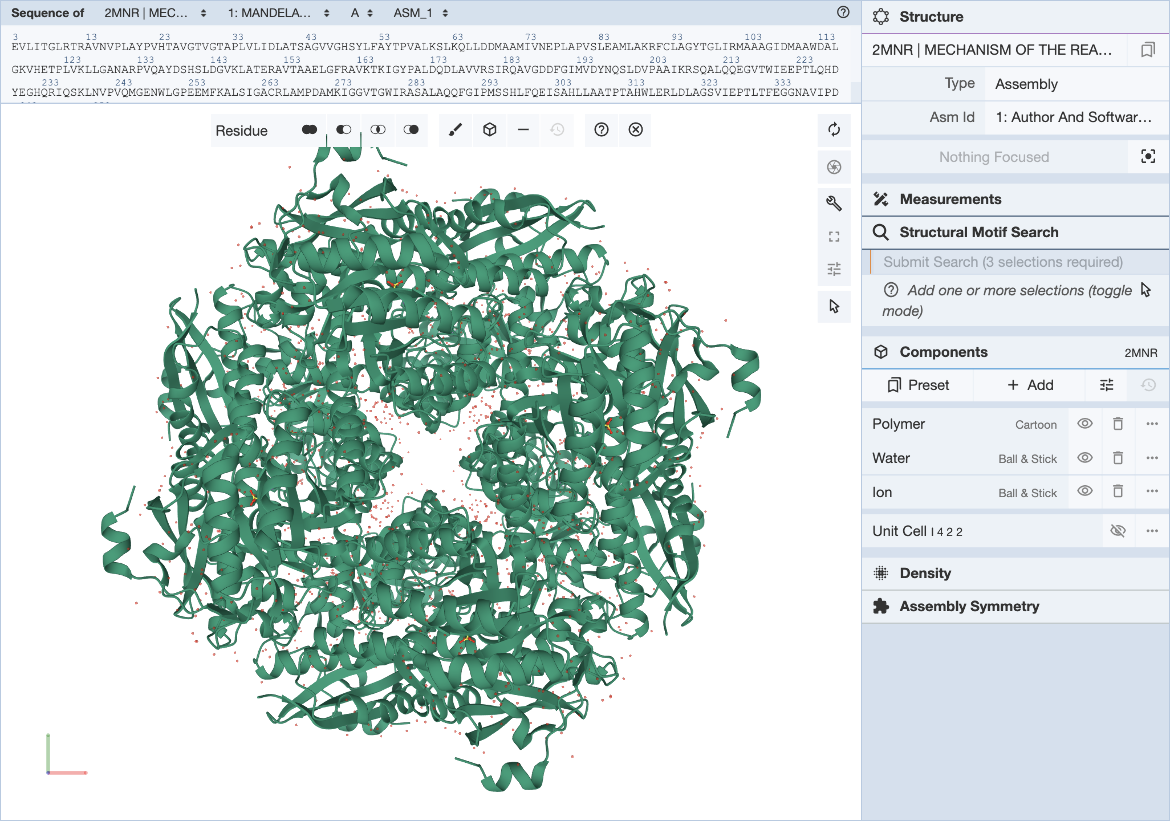
| Mol* user interface with 3D Motif Search panel expanded. |
To define a structure motif query for the enolase superfamily based on mandelate racemase (PDB ID 2mnr) and using the template described in (Meng, 2004) use the following steps.
In the Mol* interface, click and expand the ‘Structure Motif Search’ menu in the control panel on the right. Activate the selection mode of Mol* by clicking the mouse pointer icon and set the selection level to Residue (default). This allows you to select individual residues that will define the query.
|
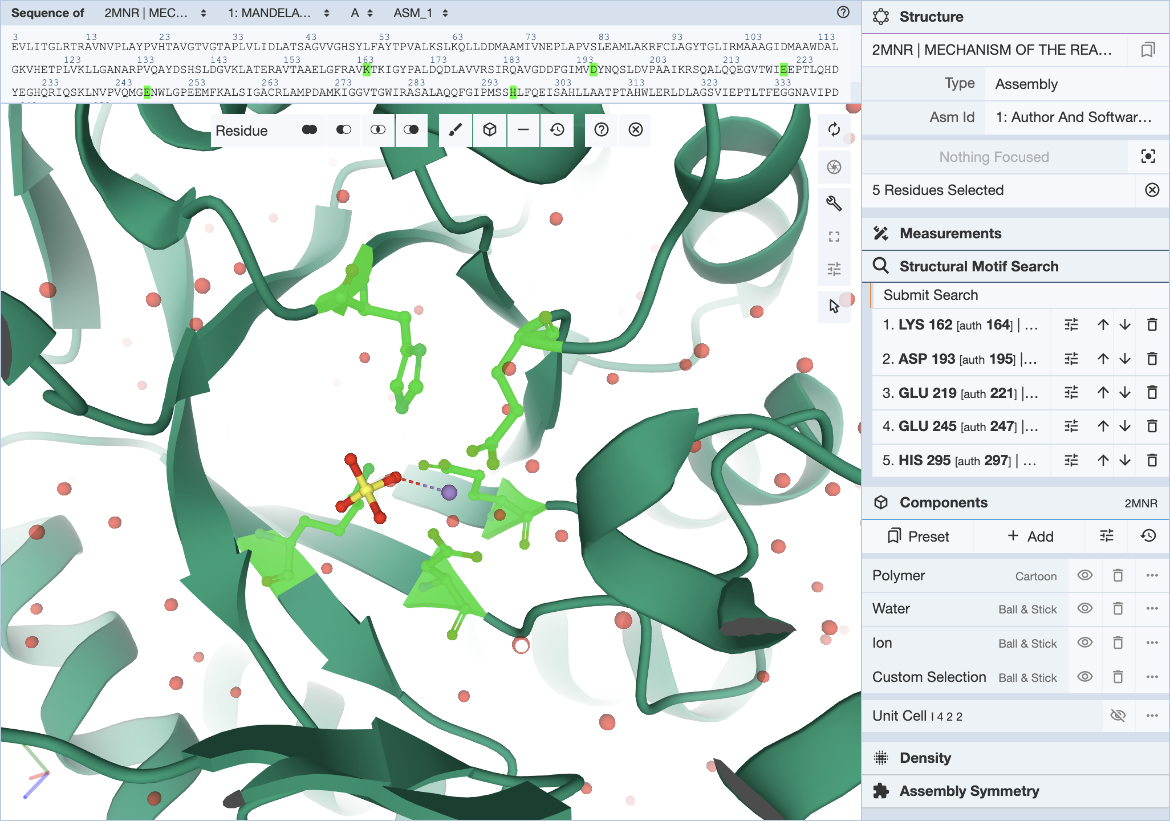
| Mol* user interface with motif selected. |
The 5 residues that constitute the template described in literature are used here to define the query motif.
Select individual residues by clicking on them either in the 3D canvas or in the sequence panel. The selected residues will be populated in the Structure Motif Search list in the control panel. Up to 10 residues may be included in this list. Add to the selection by clicking on additional residues, or remove residues by clicking on the trash icon in the residue list. The ‘Structural Motif Search’ element of Mol* behaves like the ‘Measurements’ panel.
Hover over the residue of interest to verify label_asym_id and label_seq_id. The information will appear in the tooltip in the bottom right corner of the Mol* panel. Author defined chain IDs and residue numbers will appear in square brackets if label and author identifiers are different. The sequence view at the top is particularly helpful when selecting residues by author numbering. Discrepancies between label_seq_id and auth_seq_id will be shown by Mol* in square brackets. Learn more about Identifiers in the PDB.
|
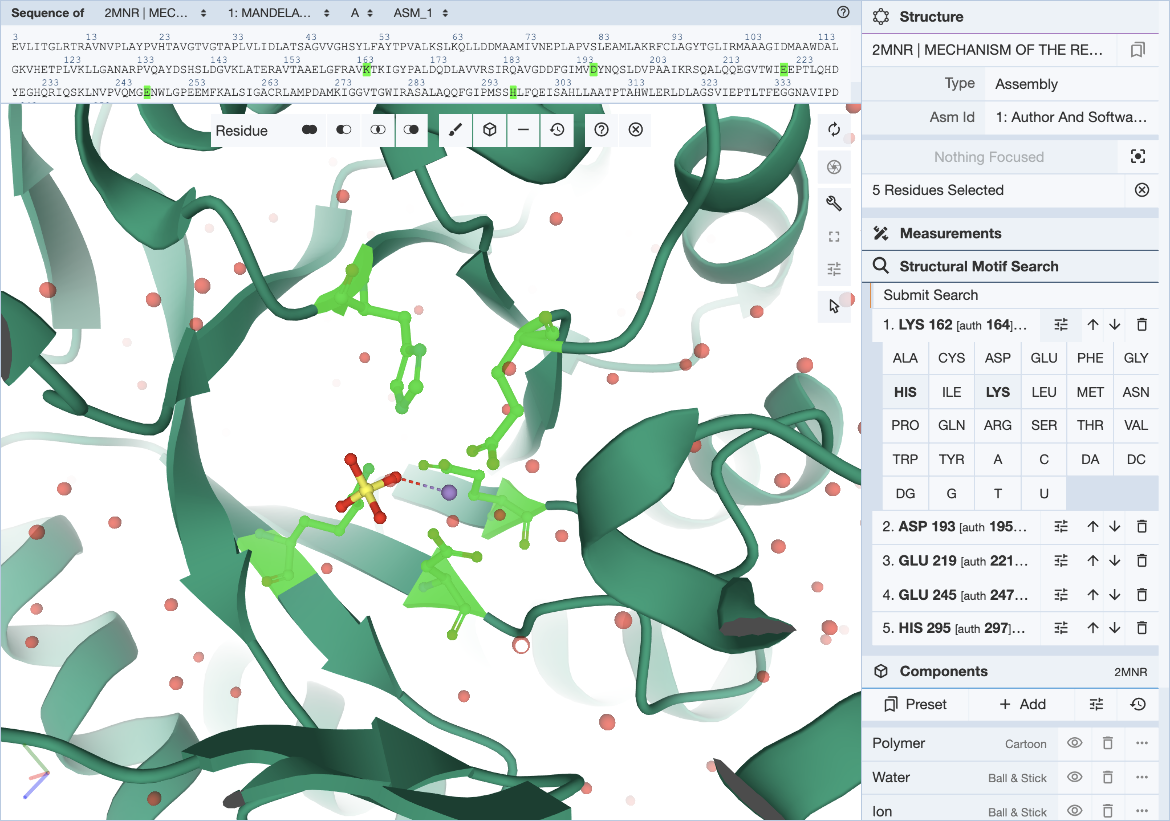
| Mol* user interface with exchange panel expanded and selections specified. |
In cases where a range of amino acids (or nucleotides) may realize the same biological function or bind the same ligand, it is possible to define position-specific exchanges in the query to accommodate possible variations in specific locations of the query structure motif.
For each entry of the residue list, exchanges can be specified individually by clicking on the options icon (three horizontal bars with short vertical lines intersecting them). This will open a panel with 20 amino acid and 8 nucleotide names. Click on all three-letter codes that should be considered as valid exchanges at the corresponding position. Only the original residue type is valid if no exchanges are defined. Make sure to include the original residue type when additional exchanges are defined. The number of exchanges per position is limited to 4.
Click the ‘Submit Search’ button. This will open a new browser tab and your query will be shown in the Advanced Search tool.
Besides using the Mol* visualization options linked to Structure Summary pages of 3D structures available from the RCSB.org, a file upload functionality is available in the Mol* standalone tool (rcsb.org/3d-view). Once you upload a structure file from your local drive or by specifying a URL you can define a structure motif query as described above. Mol* will detect whether your file is an archive structure (and reference it using its Entry ID), a structure that was loaded using an external URL (and reference it using that link), or if you are visualizing a local file (in that case your file will be uploaded to our servers) and save the appropriate ID/link to the Advanced Search.
Search Results
The results are displayed as Assemblies.
All assemblies in the PDB archive that contain groups of residues that resemble the query motif are returned and sets of residues that match the query are identified by their label_asym_id and label_seq_id. Discrepancies between label_seq_id and auth_seq_id will be reported in square brackets. The label_comp_id of each residue is reported. The RMSD score of the match is provided as well.
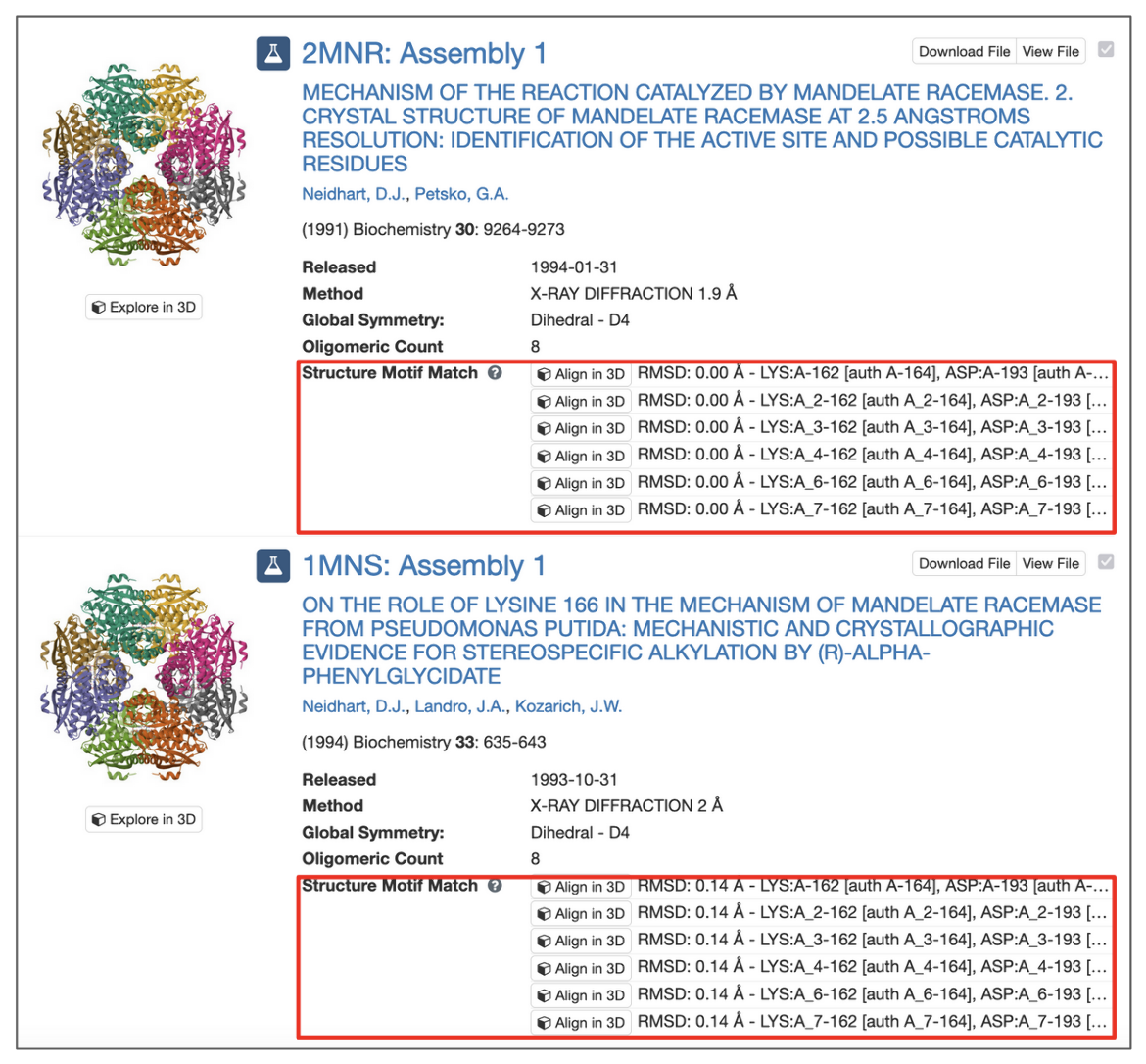
|
| 3D Motif search results with match context. |
All potential matches are reported with a root-mean-square deviation (RMSD) score, which is computed by aligning each identified match to the query motif and measuring the displacement of each matched atom. Values of 0.0 Å indicate optimal alignment, higher values occur for dissimilar groups of residues.
Motifs may occur in symmetry partners of the deposited coordinates. In these cases, chain identifiers will include the corresponding struct_oper_id after an underscore (e.g., LYS:A_2-162).
The 'Align' button at the beginning of each line launches a Mol* view that shows the superposition of query motif and selected match.
Limitations of 3D Motif Search
The structure motif search service is a heuristic search with a false negative rate <2%. This means that 1 in 50 relevant hits will get missed when compared to a much slower exhaustive search strategy. The service uses 3 features to describe the geometric properties of all residue pairs present in the query motif: backbone distance (db), side-chain distance (ds), and the angle θ between the CαCβ vector of both amino acids. Hits will get missed if one of these properties differs too much. Tolerance values are 1 Å for distances and 20° for the angle property.
The false positive rate for hits with low RMSD values <0.5 Å tends to be 0, but the false positive rate increases for hits with higher RMSD values. This also means that no hits will be found in structures that contain only a Cα trace.
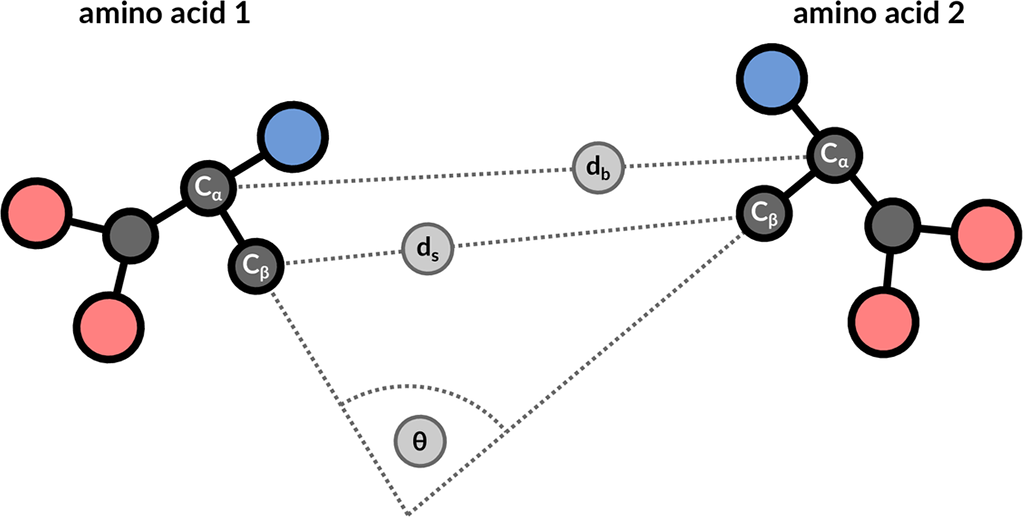
|
| 3 geometric properties are used to describe residue pairs: backbone distance between Cα atoms, side-chain distance between Cβ atoms, and angle between the corresponding vectors. |
Details about the search algorithm and scoring are discussed in Bittrich et al., 2020. In particular, see Figure 3 and the accompanying discussion of observed false negatives. The 'For advanced users' section provides information on how to run structure motif queries with increased tolerance values that lower false negative rates at the expense of higher runtimes.
Examples
The structure motif search service finds resemblances of 2 to 10 residues that are in spatial proximity. Interesting motifs are defined in literature and available in resources such as the Catalytic Site Atlas (CSA). It is applicable for a number of example queries. All given identifiers are label_asym_id and label_seq_id.
Table 1: Examples of Structure Motif Search
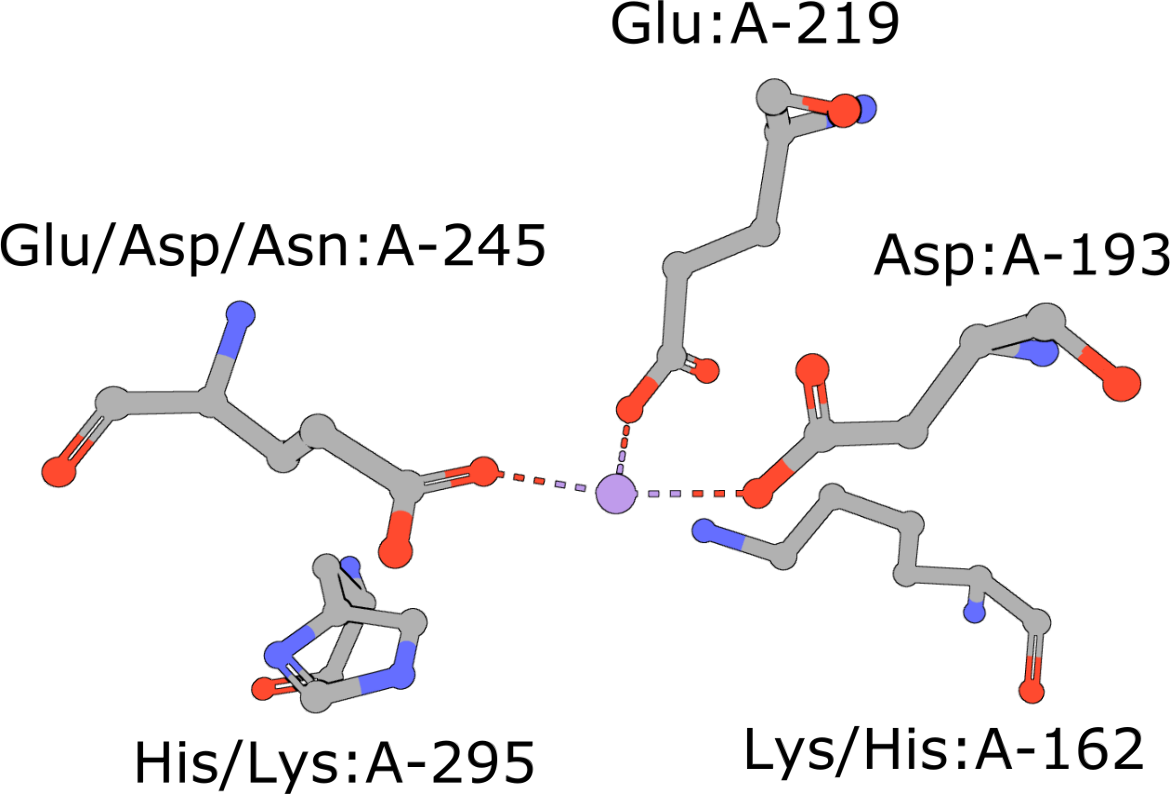 |
Template of the enolase superfamily
(execute query) The enolase superfamily is a group of proteins diverse in sequence, yet largely similar in 3D structure that all catalyze removal of a proton from a carboxylic acid (Babbitt, 1996). The structure motif supporting this catalytic function (Meng, 2004) is represented in PDB ID 2mnr. |
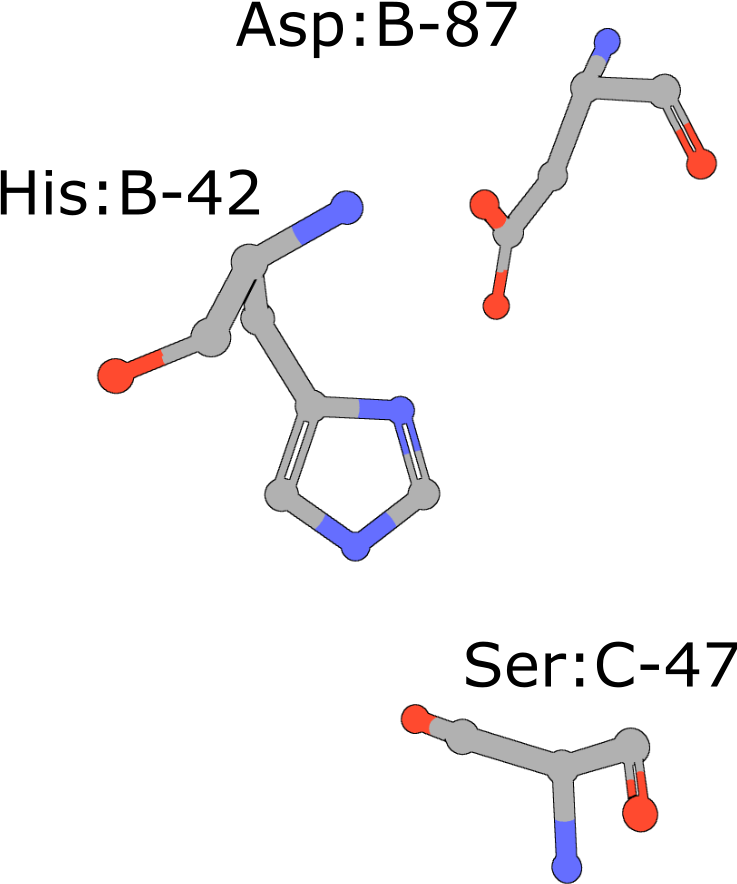 |
Catalytic triad of serine proteases
(execute query) Many hydrolases use a serine nucleophile during catalysis. Canonical serine protease catalytic triads are composed of His, Asp, and Ser residues (PDB ID 4cha). Typically these residues occur within two polypeptide chains, because many of these proteases are initially made as zymogens that require activation by proteolytic processing (Hedstrom, 2002) to prevent uncontrolled digestion of proteins within the cell. You can also combine your query with keywords to narrow the result set and find more interesting occurrences of the query motif. |
 |
Aminopeptidase
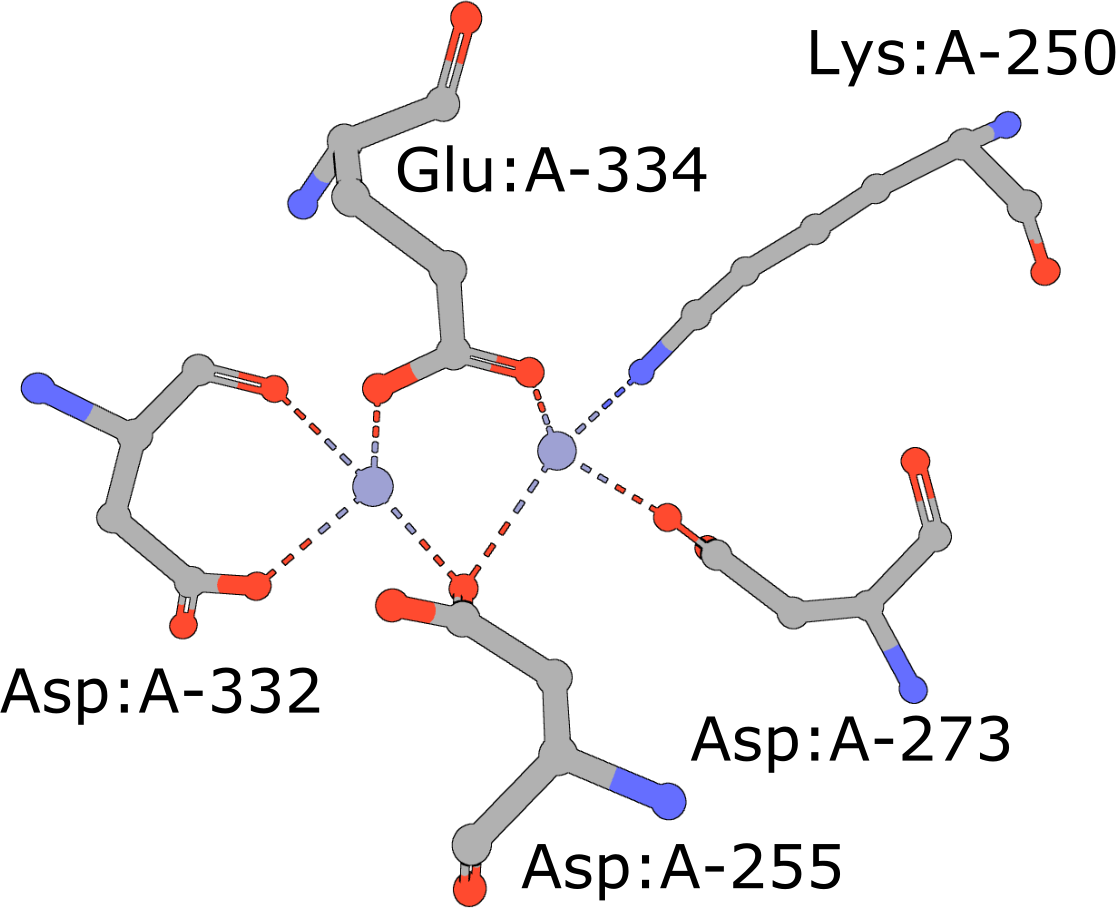
(execute query) Aminopeptidases play important roles in protein degradation by removing residues from the N- or amino terminus of polypeptide chains (Burley, 1990). Bovine leucine aminopeptidase (BLLAP) is a homohexameric enzyme with 32 quaternary symmetry. The active site of BLLAP contains two adjacent zinc ions separated by ∼2.9 Å and coordinated by the sidechains of five conserved residues Lys, Asp, Asp, Asp, and Glu (PDB ID 1lap). |
 |
Zinc Finger
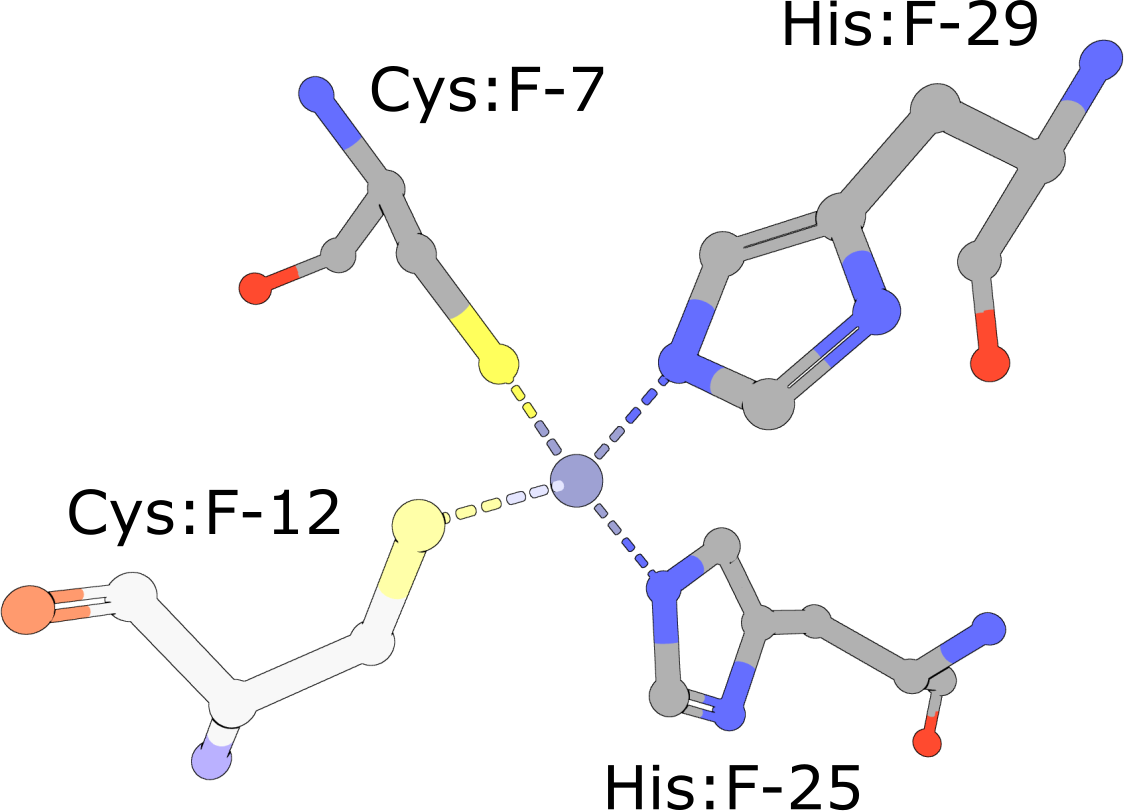
(execute query) Eukaryotic transcription factors often contain His2/Cys2 Zinc Finger domains (PDB ID 1g2f) that bind DNA. These motifs are composed of two cysteine and two histidine residues, which stabilize a small ββα domain structure that envelopes and coordinates a single zinc ion (Pabo, 2001). In the absence of the zinc ion, these domains do not adopt compact, folded structures and are incapable of binding DNA. |
 |
RNA G-tetrad
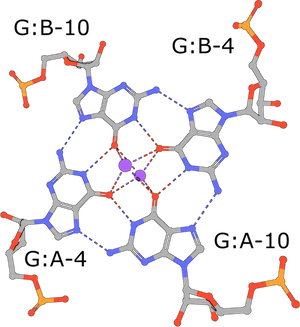
(execute query) G-tetrads are a common nucleic acid association motif (PDB ID 3mij). They are composed of guanines and stabilized by Hoogsteen base pairings. The four O6 oxygen atoms coordinate monovalent ions, such as K+, and individual tetrads tend to be stacked one atop the other (Burge, 2006). |
 |
Cadmium Coordination
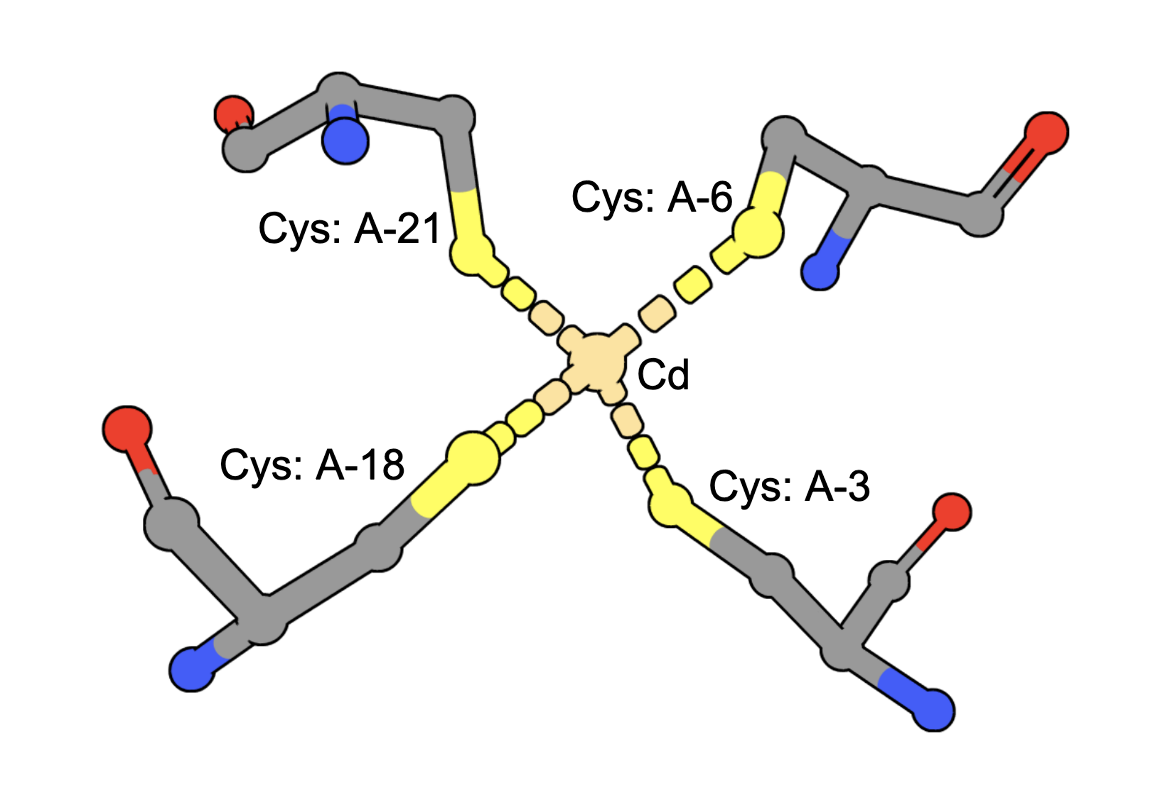
(execute query) Cadmium ions can bind to sulfur containing amino acids (e.g., Cys) in proteins. A query to find structures with Cd bound by four Cys residues can be constructed by combining two types of queries: a. structure motif search - for structures with 4 Cys residues around an ion (often Zinc is found in these geometries), AND b. chemical attribute search - for structures that contain a Cd ion The query finds an intersection of (structures with Cd) and (structures with 4 Cys residues positioned to coordinate an ion). An example from the results shows a structure that has a Cd bound to four Cys amino acids from the PDB ID 5sbj. Note: It is possible that structures have the Cd but it is not coordinated by the 4 Cys residues. Thus the results of this query should be examined carefully to ensure that they include at least one cadmium coordinated by Cys4. |
For Advanced Users
All Java source-code is publicly available on GitHub (github.com/rcsb/strucmotif-search), and the project is distributed as a Maven artifact.
We encourage interested users to set up a local installation of the structure motif search service. This allows you to configure the tool for your exact requirements and gives fine-grained control over all parameters, some of which are not exposed on RCSB.org. Additional features include:
- Increased tolerance values that allow one to retrieve more dissimilar hits
- Definition of query motifs using custom structures that are not part of the PDB archive (such as AlphaFold structures)
- Screening for occurrences of known motifs in a structure of unknown function
References
- Bittrich S, Burley SK, Rose AS (2020) Real-time structural motif searching in proteins using an inverted index strategy. PLoS computational biology. 16(12): e1008502, doi: 10.1371/journal.pcbi.1008502
- Meng EC, Polacco BJ, Babbitt PC (2004) Superfamily active site templates. PROTEINS: Structure, Function, and Bioinformatics. 55(4): 962–976, doi: 10.1002/prot.20099.
- Babbitt PC, Hasson MS, Wedekind JE, Palmer DR, Barrett WC, Reed GH, et al. (1996) The enolase superfamily: a general strategy for enzyme-catalyzed abstraction of the α-protons of carboxylic acids. Biochemistry. 35(51): 16489–16501, doi: 10.1021/bi9616413.
- Hedstrom L. (2002) Serine protease mechanism and specificity. Chemical reviews. 102(12): 4501–4524, doi: 10.1021/cr000033x.
- Burley SK, David PR, Taylor A, Lipscomb WN (1990) Molecular structure of leucine aminopeptidase at 2.7-A resolution. Proceedings of the National Academy of Sciences. 87(17): 6878–6882.
- Pabo CO, Peisach E, Grant RA (2001) Design and selection of novel Cys2His2 zinc finger proteins. Annual review of biochemistry. 70(1):313–340, doi: 10.1146/annurev.biochem.70.1.313.
- Burge S, Parkinson GN, Hazel P, Todd AK, Neidle S (2006) Quadruplex DNA: sequence, topology and structure. Nucleic acids research. 34(19): 5402–5415, doi: 10.1093/nar/gkl655.